You’ve been using ChatGPT for months, maybe even years. You’ve built custom GPTs, trained it on your brand, and helped it understand how you talk and sell. And yes, it works but not always as smoothly or completely as you want it to.
You open a new chat and have to re-explain who you are. You switch tasks and have to repeat what you need. And every time a new update comes out, you hope it finally closes the gap, but it still feels like something is missing.
That is why more real estate professionals are starting to explore Claude. Not because it is the latest trend, but because it handles certain parts of the workflow in a way that feels more natural and more aligned with how agents actually work.
In this Free Halo Live Webinar, Nick Krem, CEO and co-founder of the Krem Institute of Artificial Intelligence, breaks down what Claude is, why more agents are paying attention to it, and how to set it up from scratch. You will also get access to a free skill that can turn one listing link into ready-to-use marketing content.
Claude is an AI assistant created by Anthropic, a safety-focused AI research company founded in 2021 by former OpenAI researchers, including Dario Amodei and Daniela Amodei.
Just as OpenAI makes ChatGPT, Anthropic makes Claude. The two platforms are direct competitors, but they've taken meaningfully different approaches to how AI assistants are built, trained, and deployed.
According to Anthropic's published research, their models are designed with a focus on reliability, honesty, and long-context reasoning qualities that make Claude particularly well-suited to complex, multi-step tasks like real estate marketing, client communication, and transaction support.
Here’s the honest reason. A growing number of real estate professionals kept waiting for ChatGPT updates to close the gap with what Claude was already doing well. But for many of them, that never fully happened.
Nick Krem said it clearly: they went through several ChatGPT update cycles and still felt like it had not caught up to what Claude could do for their workflow.
This is not a knock on ChatGPT. Both platforms are improving fast. But for agents who want an AI that feels more consistent, more connected, and easier to use across tasks, Claude feels like a better fit right now.
Here are the biggest reasons why:
1. Better memory across conversations
Claude does a better job carrying context from one conversation to the next, which means less repeating and less time spent re-explaining your workflow.
2. Less manual setup
Instead of constantly choosing the right tool, prompt, or custom GPT, Claude can feel more seamless in the way it supports different tasks.
3. Stronger output for day-to-day agent work
For things like listing descriptions, scripts, buyer presentations, and other nuanced writing tasks, many agents find the output more reliable and easier to use.
4. Custom GPTs are being retired
OpenAI is retiring custom GPTs. Its Custom GPT retirement and migration FAQ puts the date at December 11, 2026 (some Enterprise workspaces with an approved deferral get until February 11, 2027). GPTs move to ChatGPT plugins: the instructions become a skill and the knowledge files are copied over, but custom actions, the model you picked and your sharing settings don't carry over, and a migrated personal plugin starts out private. Claude Skills already work this way today, and you can share one with your team as a file.
5. No ads
Anthropic has committed to keeping Claude ad-free: no sponsored links next to your chats, and no advertisers shaping the answers. ChatGPT now shows ads on its Free and Go plans; Plus and the plans above it are ad-free.
6. More on the free plan
Claude's free plan includes memory across conversations, web search, file creation, connections to your apps and tools, Artifacts, and Claude Design, Slides and Docs. That is why every feature in this training could be shown on a free account.
A growing body of research highlights how critical instruction-following and context handling are to real-world AI performance.
For example, Stanford research on large language models shows that their ability to follow multi-step instructions is essential for practical applications and complex task execution.
Additional studies on instruction-following and long-context evaluation confirm that models perform significantly better when they can retain context and accurately interpret user instructions across longer inputs.
Here is how the two compare for an agent choosing one today.
| Claude | ChatGPT | |
|---|---|---|
| Made by | Anthropic | OpenAI |
| Cheapest paid plan | Pro: $20/month, or $17/month billed yearly | Go: $8/month; Plus, with the advanced reasoning models, is $20/month |
| Bigger plans | Max, from $100/month (5x or 20x Pro's usage) | Pro, from $100/month |
| Ads | None | On Free and Go; none on Plus and up |
| Models | Haiku and Sonnet on Free; Opus on Pro; Fable on Pro through usage credits | OpenAI's GPT models; the advanced reasoning models start on Plus |
| Custom assistants | Skills, which start on their own when your request fits | Custom GPTs you pick by hand, retiring December 11, 2026 and moving to plugins |
| Memory | Across conversations, on the free plan too | Yes; Go and up keep a longer memory |
| Switching | Import Memory brings over what ChatGPT knows about you in about five minutes | The most used A.I. tool among REALTORS® (58%, NAR 2025 Technology Survey) |
US prices from claude.com/pricing and chatgpt.com/pricing, checked October 24, 2026. Plans and prices change often, so check before you buy. Agent figure: NAR 2025 Technology Survey.
Both companies are now building A.I. that works for you in the background, not only when you open a chat.
ChatGPT Dots (OpenAI, September 29, 2026) are always-on agents. Each dot has its own cloud computer, keeps working toward your goals between conversations, and learns from your feedback. You can reach it in ChatGPT, Slack or Teams, and set Custom Rules for what it may do on its own, what needs your approval and what it must never do.
Claude Duet (Anthropic, October 21, 2026) is a proactive personal agent. It sends you a short brief each morning on what matters in your connected apps, checks them every few hours and alerts you when something needs attention, and takes on bigger jobs like a financial model or a deck. It uses the memory, skills and apps already in your Claude account, and asks before it sends a message, makes a payment, signs a document or deletes anything.
| Claude Duet | ChatGPT Dots | |
|---|---|---|
| Status | Research preview, by waitlist | Rolling out gradually |
| Plans | Pro and Max, in the US | Pro and Business Premium (Pro not yet in the EEA, Switzerland or the UK) |
| Starts at | $20/month (Pro) | $100/month (Pro) |
| Runs on | Claude Opus 5.5 | GPT-6 Astra |
| Where | Its own app on iPhone and Android, and claude.ai | ChatGPT, Slack and Teams |
| Stays in control | Asks before messages, payments, signatures and deletions | Custom Rules: allow, ask first, or block |
Sources: Introducing dots and Getting started with your dot (OpenAI); Introducing Claude Duet and Get started with Claude Duet (Anthropic). Checked October 24, 2026.
For an agent, this is the next step after skills: instead of asking for each listing post or follow-up, you could let one of these watch your inbox and calendar, brief you each morning, and draft the follow-ups for you to approve. Both are new, so start with small, low-risk jobs and keep approvals on.
When this training was recorded, Claude offered Haiku 4.5, Sonnet 4.6 and Opus 4.6. Anthropic has released newer versions of all three since, plus a fourth, more powerful model. As of October 2026, Anthropic lists four current models:
→ Haiku 5.5
The fastest model. A good choice for everyday tasks like drafting emails, answering questions and quick rewrites. Available on the free plan.
→ Sonnet 5.5
Anthropic calls it the best combination of speed and intelligence. It is the best fit for most real estate work, like listing descriptions, emails and social posts, and it is available on the free plan.
→ Opus 5.5
Built for long, multi-step work, and the model Anthropic suggests starting with for most jobs. It comes with the paid plans and uses more of your usage than Sonnet, so save it for bigger tasks: a full marketing plan, a listing presentation, a final review of high-stakes copy.
→ Fable 5.1
The most capable model, for the hardest reasoning and long projects. On the Pro plan it runs on usage credits, so most agents won't need it day to day.
One of our clients on the $100 per month Max plan used up his entire daily allocation in just a few hours because he was running the most powerful model for every task. The fix was simple. Start with Haiku or Sonnet, and only move up when the task actually calls for it.
The bottom line is, on the free plan, use Sonnet 5.5 for most work and Haiku 5.5 for quick jobs. On Pro, add Opus 5.5 for the big ones.
-w960.webp)
One of Claude’s most useful and overlooked features is that it can build a profile around who you are, what you do, and how you work. Once it is set up correctly, Claude can carry that context across conversations so you do not have to repeat yourself every time you start a new chat.
Here is how to set it up from day one.
Go to Claude and create your free account. The fastest way is usually to sign up with Google.
Once you are inside, click the icon in the top left corner to open the sidebar. Then scroll down and click Settings.
Inside Settings, go to General and fill in your personal preferences.
This is where you tell Claude the basics about who you are and how you work. Add details like your name, your role, your market, and your communication style. Think of this like setting up custom instructions in ChatGPT, but in Claude, this information can carry more naturally into your workflow.
Next, go to Privacy, then Memory Preferences, then Manage Memory.
Make sure Generate memory from chat history is turned on.
This is where Claude starts to feel different. Once memory is enabled, it can connect information across your conversations. What you share in one chat can help inform the next one. That means less repeating, less setup, and less time spent reminding the AI who you are and what you need.
For real estate agents juggling listings, buyer outreach, social media, and email marketing, this can make a big difference.
In Settings, go to Capabilities and make sure Artifacts is turned on.
Artifacts let Claude create more structured outputs directly inside the chat. That can include things like formatted documents, code, simple web pages, and visual mockups.
This makes Claude especially useful when you want more than just text on a screen.
For example, let’s say you drive past a billboard and love the design. You take a photo, upload it into Claude, and say, “Build something like this for my new listing using my brand colors.” Claude can use that visual reference to help create something more polished and customized.
Once these settings are turned on, Claude becomes much more useful as a day-to-day assistant. It has more context, requires less repetition, and can help you move faster across different types of tasks.
If you've spent months or years building context in ChatGPT — your preferences, your tone, your workflows, you don't have to start from zero.
Claude has a built-in memory import tool that pulls your data from ChatGPT automatically.
Here's how it works:
Within minutes, Claude will have absorbed years of context like your communication style, your market focus, your preferences, your goals. The trainers compared it to moving into a new house that somehow already feels like home.
This process just takes under five minutes and requires no technical knowledge.
Custom GPTs were a powerful idea. You build a specialized assistant for a specific task, train it with instructions, and call on it when you need it.
The problem is you have to remember to call on it. You have to manage which GPT handles which task, and you can only use one at a time.
And they are going away: OpenAI is retiring custom GPTs on December 11, 2026 and moving them to plugins.
Claude's Skills system solves all of that.
A Skill is essentially the same thing as a Custom GPT, it's like a specialized set of instructions Claude knows how to follow. The difference is in how they're triggered.
With ChatGPT, you manually select a GPT before starting a task.
With Claude, you don't have to select anything. Claude reads your message, recognizes what kind of task it is, and automatically activates the right Skill. The whole process is invisible.
Here's a live example from the training: a trainer typed "create marketing for" and pasted a Zillow listing link. Nothing else. Claude immediately identified the task as a listing marketing request, activated the My Listing Buddy skill on its own, and produced:
We didn't name the skill, didn't tell Claude what to do, just described the task in plain language.
This is the operating system model, you talk to Claude like a teammate, and it figures out which tools to apply.
According to HubSpot’s 2024 State of Marketing Report, professionals using AI for content creation save an average of 3 to 5 hours each week on recurring tasks. For real estate agents, that can mean less time piecing together marketing from scratch and more time focused on clients, follow-up, and closing deals.
Nick Krem created My Listing Buddy, a custom GPT in the ChatGPT store that has been used by over 400 real estate professionals. It writes SEO, AEO, and GEO-optimized listing descriptions, Just Listed posts, Just Sold posts, and full marketing packages.
Like every custom GPT, the ChatGPT version is scheduled to retire on December 11, 2026, so the Claude Skill below is the version to install.
We have now converted it into a Claude Skill and we're giving this amazing tool away for FREE.
Here's how to install it:
Once installed, Claude will automatically use it any time you're working on property marketing. You'll also be able to see the skill's description, triggers, and training instructions directly inside the Skills panel.
The My Listing Buddy skill is designed to help Claude create property marketing content that is easier to find across the new layers of online search.
It trains Claude to write for three different types of visibility:
SEO - This is traditional search engine optimization. It helps your content show up in standard Google search results when people search for homes, neighborhoods, or local real estate topics.
AEO - This stands for Answer Engine Optimization. It focuses on writing content in a way that makes it more likely to appear in direct answers, featured snippets, and voice-based search results.
GEO - This means Generative Engine Optimization. It is about creating content that AI systems like ChatGPT, Claude, and Google’s AI-powered search experiences can understand, summarize, and surface when people ask conversational questions.
Search behavior is changing fast. BrightEdge has reported that Google’s AI-driven search experiences are reshaping how content appears in results, including the growth of AI Overviews and the increasing importance of being cited by generative search systems. BrightEdge also notes that winning visibility now goes beyond classic SEO and requires content that can perform across traditional search and AI-generated answers.
For real estate agents, that is a big deal.
Buyers are no longer just typing short searches like “homes for sale in Tampa.” More of them are asking full questions like:
The My Listing Buddy skill helps Claude generate content that is better suited for that kind of search behavior. Instead of only writing for a listing page, it helps shape content so it can also support answer-style search, AI summaries, and conversational discovery.
That means the output is not just written to sound good. It is written to be more useful, more searchable, and more aligned with where real estate marketing is heading.
👉 If you're curious on how show up and win listings in Google and ChatGPT, check out these 6 Strategies to Rank #1 on Google and AI Search
You don't have to rely on pre-built skills. Claude can help you create your own and it's simpler than building a Custom GPT.
Here's the process:
The download option is particularly useful for brokers and team leads. Build a skill once, share the file, and every agent on your team can install it in seconds.
One trainer built a Listing Appointment Prep Skill using this exact process. The result is an HTML tool that takes a property address, the agent's name, and an appointment date and generates a complete pre-listing dossier including:
The whole build took about 10 minutes. The output would take a human researcher hours.
Claude is not just being used for listing descriptions. Agents are starting to use it across the full range of day-to-day real estate work, especially in areas where speed, consistency, and content creation matter most.
→ Listing Marketing
Claude can turn a single property link into a full marketing package, including an MLS-ready description, social media captions, email copy, and other promotional content without starting from scratch.
→ Buyer Outreach
Agents are using Claude to write personalized follow-up emails, nurture sequences, market update messages, and responses that feel more tailored to each buyer’s situation.
→ Listing Appointment Prep
Claude helps organize prep work for listing presentations with comp summaries, pricing strategy talking points, and objection-handling scripts, giving agents a faster starting point.
→ Social Media Content
For Just Listed, Just Sold, open house promotions, neighborhood highlights, and lifestyle content, Claude can generate ideas and draft posts much faster.
→ Website and Landing Page Copy
Agents use Claude to map out website copy, landing page sections, and marketing content in plain language, and in some cases generate simple HTML-based pages.
→ Video Scripts and Captions
Claude can create video outlines, talking points, short-form captions, and promotional scripts from something as simple as a property address or topic idea.
What makes this useful is not just the range of tasks. It is the fact that one tool can support multiple parts of an agent’s workflow without needing to rebuild the context every time.
That lines up with what NAR has reported more broadly. Its REALTOR® Technology Survey shows that real estate professionals continue to rely heavily on digital tools to support lead generation, client service, and day-to-day business operations, while NAR’s AI resource page specifically highlights uses like listing descriptions, property searches, and marketing content.
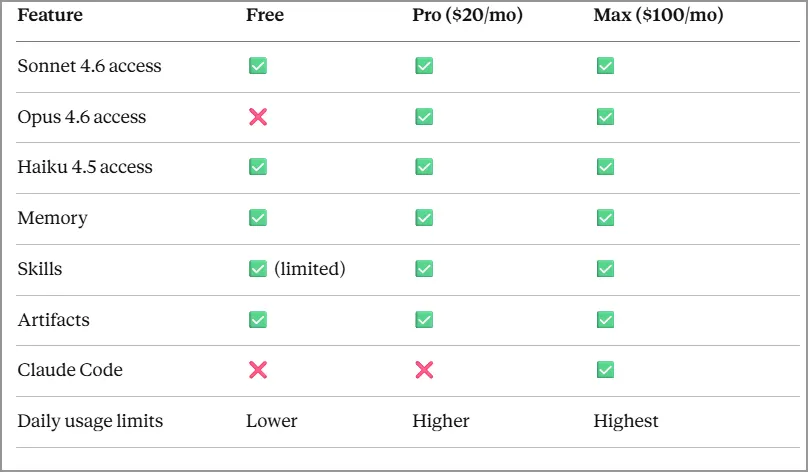
For most agents getting started, the free plan is completely sufficient. We demonstrated every feature covered here on a free account.
If you're using Claude heavily for client communication, marketing generation, and research every day, the Pro plan ($20/month, or $17/month billed yearly) is likely worth it. It adds more usage, Opus, Projects, Claude in Chrome and Microsoft 365, and tasks you can hand off and schedule. The Max plan, from $100/month, gives 5x or 20x Pro's usage and is designed for power users running code-heavy or high-volume automation workflows. Prices as of October 24, 2026.
Reading about Claude is helpful. But seeing how real estate professionals are actually using AI to create marketing faster, write better content, and save hours every week hits differently.
In our Free Halo Live Webinar, Nick Krem, CEO and co-founder of the Krem Institute of Artificial Intelligence shows you exactly how to use tools like this to:
If you’ve been wondering how to actually use AI in your business, this is the place to start.
👉 Join the Free Halo Live Webinar
If you keep re-explaining yourself to ChatGPT, Claude is worth trying: it carries memory from one chat to the next, starts the right skill by itself instead of making you pick a custom GPT, and its free plan covered everything shown in this training. You don't lose your setup, because Claude's Import Memory tool moves what ChatGPT knows about you in under five minutes. That matters because ChatGPT is still the A.I. tool REALTORS® use most, at 58% (NAR 2025 Technology Survey). If you stay with ChatGPT, read How Real Estate Agents Should Use ChatGPT in 2026.
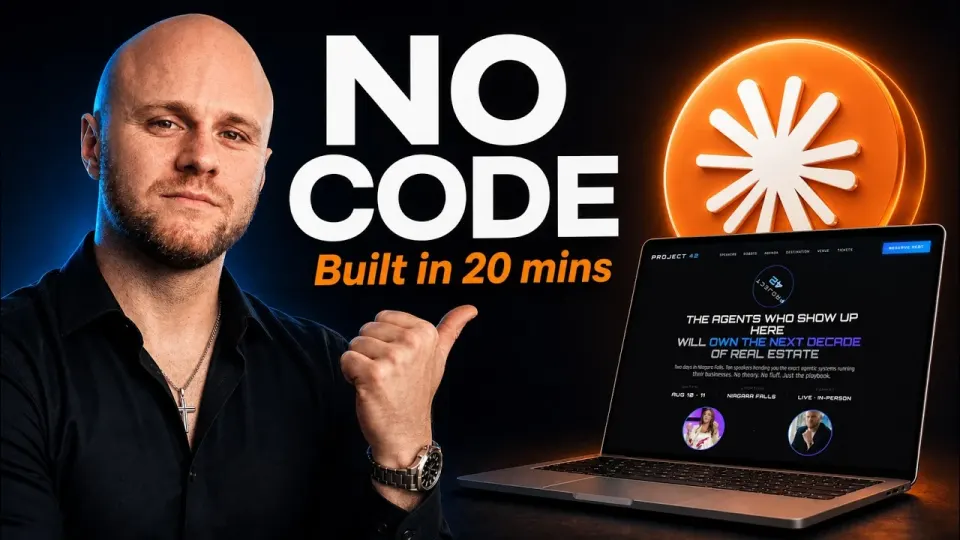
Start with the free My Listing Buddy skill: paste a Zillow link with "create marketing for" and Claude writes an MLS-ready listing description, a bullet-point summary, a Facebook post and an Instagram post. You can also build your own by typing "I want to create a skill"; one trainer built a Listing Appointment Prep skill in about 10 minutes. To build pages with Claude, see How to Build a Real Estate Website With Claude AI in 20 Minutes and Instagram Carousels for Realtors: Build Branded Posts Faster With Claude AI.
Claude is an AI assistant developed by Anthropic that helps real estate agents automate marketing, write listing descriptions, generate social media content, and handle client communication. It works by understanding context across conversations and applying that knowledge to future tasks, making it more efficient for ongoing real estate workflows.
Claude and ChatGPT are both powerful AI tools, but many real estate agents prefer Claude for marketing because of its memory and automatic skill activation. Claude can remember your preferences across chats and apply the right tools without manual setup, which makes it more efficient for repetitive tasks like listing content and follow-ups.
Yes, Claude offers a free plan that includes access to powerful models, memory features, and basic skills. This is enough for most real estate agents to create listing descriptions, social posts, and email campaigns without needing a paid subscription.
Agents can simply paste a property link or basic listing details into Claude, and it can generate a full listing description, property highlights, and marketing content. With tools like My Listing Buddy, this process can be automated to produce complete marketing packages in seconds.
Claude Skills are automated workflows that trigger based on your request. For real estate agents, this means you can ask for listing marketing, social media posts, or email copy, and Claude will automatically apply the correct instructions without needing to select a specific tool.
Yes, Claude allows you to import your ChatGPT memory and preferences. This helps agents keep their tone, branding, and workflows without starting from scratch when switching platforms.
Real estate agents can automate listing descriptions, social media posts, email campaigns, buyer follow-ups, video scripts, and even website content. This reduces manual work and helps agents stay consistent with their marketing.
Yes, Claude can support lead generation by creating high-quality content, follow-up messages, and marketing campaigns that attract and nurture potential clients. When used consistently, it helps agents increase visibility and engagement.
No, Claude is designed to be user-friendly. Most tasks can be done by typing simple instructions in plain language, making it accessible even for agents with little to no technical experience.
-w960.webp)







-w960.webp)